
I Built a Claude Skill That Does a Full SEO Audit in 90 Seconds. Here Is How.
Jul 13
7 min read
I want to be honest with you before we start.
This is not a post about AI changing SEO forever. You have read enough of those.
This is about one specific thing I built, what it actually does, and whether it is worth your time to build something similar.
So let me start with what happened.
The problem I kept running into
Every time a new client came in, I would spend the first few days building the same thing.
A keyword sheet.
A backlink summary.
A competitor table.
A technical issues list.
A recommendations slide deck.
The data changed. The client changed.
But the structure of the work was always the same. I was rebuilding the same container every single time.
It is not that the work was hard. It was just slow. And honestly, a little dull for the parts that were purely about formatting and organising data that a tool had already found for me.
I started looking for a way to build that container once and reuse it forever.
That is how I ended up building a Claude Skill.
What a Claude Skill actually is
Think of it like a saved workflow inside Claude.
You write a set of instructions once. You tell Claude what to do, in what order, what tools to pull data from, and what the output should look like. Then you save it as a Skill.
Next time you need that same output, you do not explain anything. You just prompt Claude normally or use a slash command, and Claude follows the instructions you already wrote.
The difference from a normal AI prompt is significant.
A prompt is a one time thing. Every time you use it, you are hoping Claude interprets your request the same way as last time. Sometimes it does. Sometimes it does not.
A Skill is locked in. The instructions do not change. The output structure does not drift. Whether you run it today or in three months, you get the same format with the latest data.
For anyone doing repeatable SEO work, that consistency matters a lot.
What my Skill actually does when I run it
Here is a concrete example.

I built a Skill for full site audits. Last week I ran it on wix.com to test it.
I typed one prompt: run a full SEO audit for wix.com.
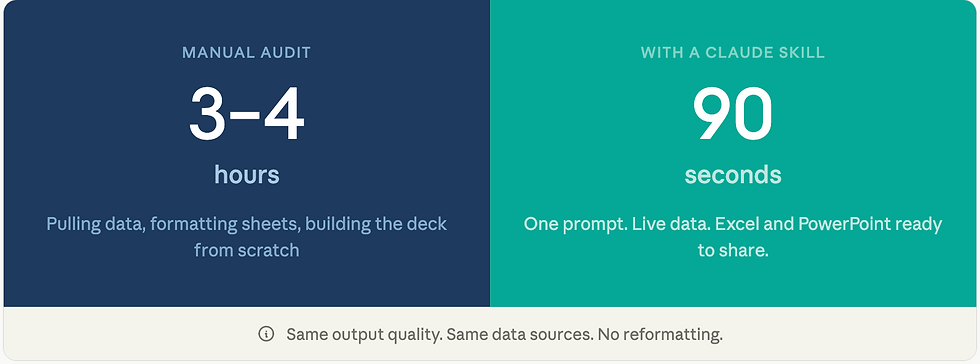
Ninety seconds later I had two files ready to share.
An Excel workbook with seven sheets:
A summary dashboard with the main numbers and colour coded status indicators
An organic keywords sheet with position data and conditional formatting so you can instantly see what is ranking well versus what needs work
A backlinks sheet with anchor text analysis
A competitor sheet showing keyword overlap with the top ten rivals
A keyword gap sheet identifying what competitors rank for that wix.com does not
A technical issues sheet organised by how serious each problem is
A recommendations table with priority scores, effort levels, and suggested timelines
A 15 slide presentation:
Cover slide, executive summary, audit scope
Domain authority with a competitor comparison chart
Traffic and keyword performance with a position breakdown chart
Top keywords table, keyword opportunities, backlink profile
Technical issues, on page assessment, priority actions
A 30, 60, 90 day roadmap and an appendix
Both files come from live data pulled in real time from SE Ranking. Not estimates.
Not what Claude knows about wix.com from its training. Actual current numbers from the tool.
That full output used to take me three to four hours to build manually. Now it takes under two minutes of my time.
What the wix.com data actually showed
Since I am using this as the real example, let me share what the Skill found.
Wix ranks for 1.17 million keywords in the US as of May 2026. Their estimated monthly organic traffic in the US alone is 1.42 million visits. Their domain authority score from SE Ranking is 100 out of 100, which is the maximum. They have 94 million backlinks pointing to them from 3.36 million different websites.
On paper this looks extraordinary. And it is.
But the Skill also flagged three critical issues that matter a lot given the scale.
First, Wix's website is heavily built on JavaScript and Google can struggle to crawl JavaScript pages reliably. At the scale Wix operates, even a small crawl inefficiency affects millions of pages.
Second, Wix has content in over 30 languages. The Skill detected this through anchor text patterns in the backlink data. But whether the international SEO setup is technically correct is unverified. This needs a dedicated hreflang audit.
Third, the keyword gap analysis found something interesting. Wix does not rank for the phrase "website builder with AI" despite this being a 30,000 monthly search query with high commercial intent. Hostinger holds the top spot there. Wix has an AI builder feature. They just are not capturing the search demand for it.
Three findings I would have spotted anyway in a manual audit. But the Skill found them in 90 seconds and put them in a slide deck already formatted for a client call.
How to build one yourself
Let me walk you through the actual process.
What you need to start
You need a Claude Pro or Team account. Skills are available on both plans.
If you want the Skill to pull live data rather than rely on what Claude already knows, you also need a tool that supports MCP. SE Ranking, which I use, supports it. So does Google Drive and a growing list of marketing platforms. You connect the tool inside Claude settings before building the Skill.
The SKILL.md file
Every Skill is built around one file. It is called SKILL.md and it is a plain text file.
It has two parts.
The first part is a short header that tells Claude the Skill's name and when to use it. The description field in this header is the most important thing you will write. Claude reads it to decide whether to trigger the Skill at all. Be specific about what phrases or situations should trigger it.
Here is roughly what mine looks like:
---
name: seo-audit
description: Run a full technical SEO audit for [any website] and
export findings as both a detailed Excel workbook and a
PowerPoint deck. Use this whenever someone asks for an SEO audit,
site audit, website health check, or SEO report.
---
The second part is the actual instructions. This is where you write, in plain language, exactly what Claude should do step by step.
My instructions cover:
Which SE Ranking tools to call and in what order to get the data
What each sheet in the Excel file should contain, including column headers and formatting rules
What each slide in the deck should contain, including what charts to build and what data to show
What to do if data is missing or thin
What the output files should be named and where to save them
You do not need to write code. You write instructions the way you would brief a very capable analyst who needs to know exactly what you want.
Testing and refining
Once the SKILL.md file is written you save it as a .skill file and install it in Claude.
Then you run it on a domain you know well so you can check the output against reality.
First runs are rarely perfect. The most common things to fix:
The description is too vague so Claude does not trigger the Skill when you expect it to. Make the description more specific about the types of prompts that should trigger it.
The instructions for the output are ambiguous so Claude makes different choices each time. Add more specificity. Spell out exact column names. Specify exact chart types. Leave less room for interpretation.
Expect two or three test runs before the output is consistently what you want.
The total time I spent building mine was about three hours. I recovered that time after two audits.
The four SEO tasks where Skills save the most time
Based on what I have built and tested, these are the workflows where Skills deliver the highest return.

Client audits. This is the obvious one. Build the output format once, pull live data every time, spend your energy on interpreting the findings rather than formatting them.
Competitive analysis. Give Claude a domain and three competitors. The Skill pulls keyword overlap, identifies gaps, and formats everything into a table sorted by opportunity size. Something that used to take an hour takes five minutes.
Content briefs. Feed a keyword. The Skill pulls ranking page data, identifies the questions people are asking, recommends a structure, and outputs a brief your writer can use immediately.
Reporting. Pull rank movement data from your SEO tool, flag drops that matter, cross reference with known algorithm updates, and output a prioritised list of what to investigate. Once a week, automatic, consistent format every time.
What Skills cannot do
I want to be clear about the limits because they are real.
A Skill surfaces data and puts it in a structure. It does not know your client's business context. It does not know whether fixing hreflang should be the top priority or whether there is a product launch in six weeks that makes it irrelevant for now. That judgment still sits with you.
The data quality depends on the tools you connect. SE Ranking data is solid but it is not identical to what Google Search Console shows. I always flag this to clients when I share the output.
And Skills take real time to build well. If you need a one time output, a regular prompt is faster. The investment pays off when you do the same type of work repeatedly.
Why I think this is worth your attention right now
Most SEO practitioners are using AI to write content or to generate ideas.
That is fine but it is leaving most of the value on the table.
The bigger opportunity is using AI to systematise the work that was always repeatable but never automated. The audits. The briefs. The reports. The analysis frameworks you rebuild from scratch every time because your context lives in your head rather than in a system.
Skills let you move that expertise out of your head and into something that runs consistently without you rebuilding it manually every time.
That is not about replacing SEO knowledge. It is about spending your knowledge on the parts that actually require it.
Where to start
If you want to try this, here is the most straightforward path.
Pick one workflow you do at least twice a month. Something with a consistent output format and consistent data sources.
Write down the steps you follow manually. Be specific. Not just "check backlinks" but "open SE Ranking, pull backlink summary for the domain, look at DoFollow ratio, check top referring domains, note the top anchor texts."
Turn those steps into instructions for a SKILL.md file. Add a clear description field. Install it. Test it three times on domains you know.
That first Skill will teach you more about what the format can do than anything you read about it.
The .skill file I built for the audit covered in this post is available to download below.
You will need to connect it to your own SE Ranking account for the live data to work but all the instructions and output structure are included.


I appreciate the honest focus on what the Claude Skill actually does instead of broad AI hype. The 90-second audit workflow is worth testing—I've been using https://fliki.pro
I like the honest framing—showing what the Claude Skill actually does in 90 seconds is more useful than another “AI will change SEO forever” claim. I’m testing something similar with https://postproxy.online
I like the practical angle—showing what the Claude skill actually does in 90 seconds instead of making sweeping AI claims. I’m curious to test it on a real site; I’ve been using https://flexclip.online
I appreciate the honest focus on what the skill actually does—not another “AI changes SEO forever” claim. The 90-second audit workflow sounds genuinely useful; I’ve been using https://image-prompt.pro/image-prompt-generator-examples
I appreciate the honest, practical angle—showing what the Claude Skill actually does in 90 seconds is far more useful than another “AI will change SEO forever” claim. I’ve been testing similar tools withwaswo https://pfpmaker.pro/pfp-maker-online